
Home › Articles › Gaming Chair Guide
What Does Lumbar Support in a Gaming Chair Actually Do?
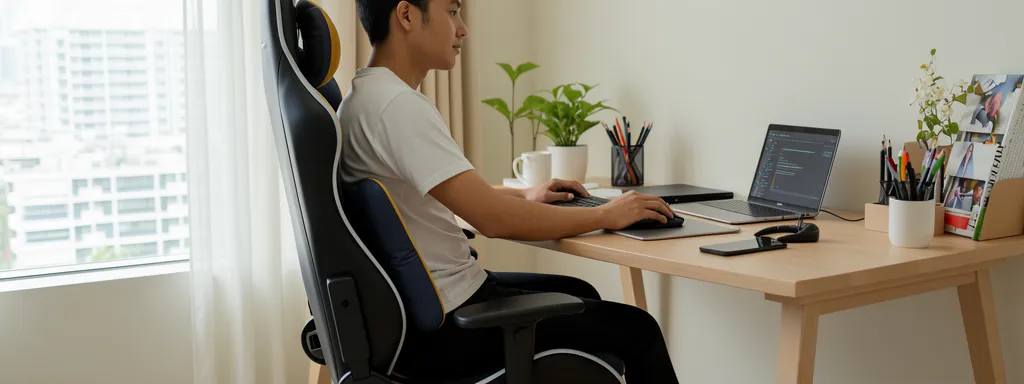
Most people buy a gaming chair for the look — but the lumbar support is the single most important feature for your long-term back health. Get it wrong and you’ll still end up with back pain after hours of sitting. This guide explains exactly what lumbar support does, how it works, and how to set it up correctly.
What Is Lumbar Support?
Lumbar support is a built-in or attachable cushion/mechanism positioned at the lower back region of a chair. Its job is to maintain the natural inward curve of your lumbar spine — called the lordotic curve — while you sit.
When you sit without lumbar support, gravity flattens your lower back into a “C” shape. This compresses the discs in your spine, strains surrounding muscles, and over time causes chronic lower back pain — one of the most common complaints among Singapore’s work-from-home and gaming population.
What Lumbar Support Actually Does
| Benefit | How It Helps |
|---|---|
| Maintains spinal curve | Fills the gap between your lower back and the chair, keeping the S-curve of your spine intact |
| Reduces lower back pain | Studies show up to 48% reduction in back pain symptoms with proper lumbar support over 4 weeks |
| Prevents slouching | Acts as a physical reminder to sit upright, reducing fatigue from constantly correcting posture |
| Reduces muscle fatigue | When the chair supports your spine, back muscles can relax instead of constantly holding you up |
| Improves focus & productivity | Less pain and discomfort means fewer distractions during long gaming or WFH sessions |
Types of Lumbar Support in Gaming Chairs
Not all lumbar support is the same. Here are the main types you’ll find in gaming chairs sold in Singapore:
| Type | How It Works | Adjustable? | Quality |
|---|---|---|---|
| Pillow/Cushion | A separate foam pillow strapped to the chair back | Height only | Basic |
| Built-in Fixed | Moulded into the chair backrest at a set position | No | Moderate |
| Adjustable Height | Built-in support that slides up/down to suit your height | Height | Good |
| 4D Adjustable | Adjusts height, depth, width and angle — found in premium chairs | Full | Best |
How to Adjust Lumbar Support Correctly
Most people set lumbar support too high or too low, making it useless or even uncomfortable. Follow these steps:
| Step | What to Do |
|---|---|
| 1 | Sit all the way back in the chair so your hips are fully against the backrest |
| 2 | Locate your natural waistline — just above your hip bones, slightly above your belt line |
| 3 | Position the lumbar support so the widest/most prominent part aligns with your waistline |
| 4 | If depth-adjustable, increase depth until you feel gentle support — not pressure or pain |
| 5 | Do the gap test: slide your hand behind your lower back. Minimal gap = correct position |
Gaming Chair vs Ergonomic Chair — Lumbar Comparison
Many Singaporeans debate whether to buy a gaming chair or an ergonomic office chair. Here’s how they compare on lumbar support specifically:
| Gaming Chair | Ergonomic Office Chair | |
|---|---|---|
| Lumbar type | Usually pillow or built-in | Integrated & adjustable |
| Adjustability | Basic to moderate | High (height + depth + angle) |
| Singapore heat | PU leather traps heat | Mesh back = better airflow |
| Price range | $200–$800 | $300–$2,000+ |
| Best for | Gaming sessions, aesthetics | Long WFH hours, back issues |
Frequently Asked Questions
Is lumbar support actually necessary?
Yes, especially if you sit for more than 4 hours a day. Without proper lumbar support, your lower back muscles constantly work to hold your posture, leading to fatigue and pain. Studies show chairs with proper lumbar support reduce back pain symptoms by up to 48% over 4 weeks.
Where exactly should the lumbar support sit on my back?
Just above your belt line, at the natural inward curve of your lower back (the lordotic curve). If it’s too high it pushes your ribs and makes you hunch; too low and it pushes your hips forward.
Why does my lumbar support feel uncomfortable?
Usually because it’s positioned incorrectly or the depth is too firm. Lower the depth to minimum and slowly increase it until you feel gentle support. Also check the height — it should align with your waistline, not your mid-back.
Is a gaming chair with lumbar support good for WFH in Singapore?
It depends on the quality of lumbar support. A premium gaming chair like the Secretlab Titan Evo with its integrated 4-way adjustable lumbar is excellent for WFH. Budget gaming chairs with basic pillows are not adequate for 8-hour work days.
Should I use the lumbar pillow or remove it?
Always use it, but make sure it’s positioned correctly. Many people remove lumbar pillows because they feel uncomfortable — but this is almost always due to incorrect positioning rather than the pillow itself being useless.
🔗 Useful Official Resources