
Home › Articles › PC & Laptop Guide
What Is the Difference Between SSD and HDD and Which Should You Get?
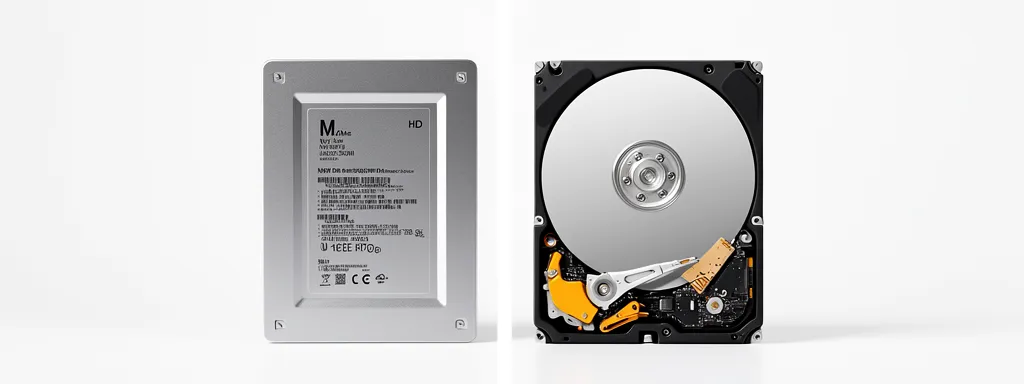
If you’re buying a laptop or PC in Singapore, you’ll see both SSD and HDD storage options. The difference between them affects everything — boot times, app loading, battery life, and even how long your device lasts. This guide breaks it all down simply.
SSD vs HDD — The Core Difference
| SSD (Solid State Drive) | HDD (Hard Disk Drive) | |
|---|---|---|
| How it stores data | Flash memory chips (no moving parts) | Spinning magnetic platters + read/write arm |
| Speed | Very fast (500–7,000 MB/s) | Slow (80–160 MB/s) |
| Durability | Shock resistant — no moving parts | Fragile — moving parts can fail from drops |
| Noise | Silent | Audible clicking/spinning |
| Power usage | Low — better battery life | Higher — drains battery faster |
| Price per GB | Higher | Cheaper |
| Lifespan | 5–10 years typical | 3–5 years typical |
How Much Faster Is an SSD?
Speed is where the difference is most dramatic. Here are real-world comparisons:
| Task | HDD | SATA SSD | NVMe SSD |
|---|---|---|---|
| Windows boot time | 45–90 sec | 15–20 sec | 8–12 sec |
| Open large Excel file | 8–15 sec | 2–4 sec | Under 1 sec |
| Game load time | 60–120 sec | 20–40 sec | 5–15 sec |
| Transfer 10GB file | ~2 min | ~20 sec | ~3 sec |
Types of SSD — SATA vs NVMe
Not all SSDs are equal. There are two main types sold in Singapore:
| SATA SSD | NVMe SSD (M.2) | |
|---|---|---|
| Read speed | ~500 MB/s | 3,000–7,000 MB/s |
| Form factor | 2.5″ drive bay | Small M.2 slot on motherboard |
| Price (1TB) | ~$80–$120 | ~$100–$180 |
| Best for | Upgrading old laptops/desktops | New builds, maximum performance |
Which Should You Get in Singapore?
| Your Situation | Recommendation | Why |
|---|---|---|
| Buying a new laptop | NVMe SSD only | Any new laptop without SSD is not worth buying in 2026 |
| Old laptop still on HDD | Upgrade to SATA SSD | Single best upgrade for old laptops — transforms performance |
| Building a desktop PC | NVMe SSD + HDD combo | SSD for OS/apps, HDD for bulk file storage |
| Need lots of cheap storage | External HDD | 4TB external HDD costs ~$150 vs $400+ for 4TB SSD |
Frequently Asked Questions
Can I replace my laptop HDD with an SSD?
Yes, in most cases. If your laptop has a 2.5″ HDD bay, you can swap it for a SATA SSD. This is one of the most cost-effective upgrades possible — transforming a sluggish old laptop for around $80–$120. Many repair shops in Singapore offer this service including data migration.
How long do SSDs last?
Modern SSDs typically last 5–10 years under normal use. They have a finite number of write cycles, but for everyday users this limit is rarely reached within the device’s practical lifespan. SSDs are significantly more durable than HDDs because they have no moving parts.
Is 256GB SSD enough for a laptop?
It’s the absolute minimum. Windows 11 alone takes ~25–30GB. With apps, documents and photos, 256GB fills up quickly. In Singapore, 512GB SSD is the recommended minimum for a new laptop purchase in 2026 — ideally 1TB if budget allows.
Does Singapore humidity affect SSD or HDD more?
HDDs are significantly more vulnerable to Singapore’s humidity. The spinning platters and magnetic heads can corrode over time in humid conditions. SSDs have no such issue — another reason they’re the better choice for Singapore’s climate.
Where can I buy SSDs in Singapore?
Sim Lim Square, Challenger, Lazada, and Shopee all carry a wide range of SSDs. Popular brands in Singapore include Samsung, WD, Seagate, Kingston, and Crucial. Always buy from authorised sellers for valid local warranty.
🔗 Useful Official Resources